
Device Management · HELP-05
EDMA Device Registration and Connectivity
Confirm that an IFP is registered, active, and reporting to EDMS.
Verify registration in the Admin Portal
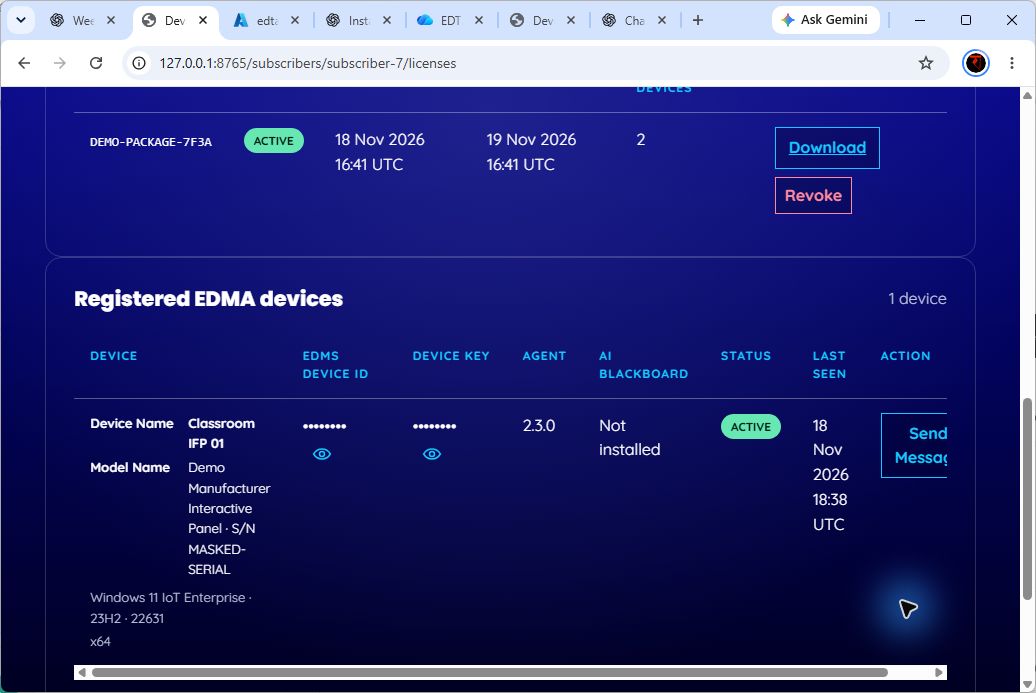
- Complete installation using a current, active EDMA batch package.
- In the Admin Portal, open EDMS > Downloads.
- Locate Registered EDMA devices.
- Match the IFP using the device name, manufacturer and model, serial number when available, Windows version and build, and architecture.
- Confirm Status is Active and Last seen shows a recent time.
- Confirm the expected Agent version. AI Blackboard may show Not installed because EDMA enrollment and AI Blackboard installation are separate.
Use the reveal control only when support requires the EDMS device ID or device key. Treat these values as sensitive.
Connectivity check
For an Active device, select Send Message, enter 1 to 256 printable characters, and select Send. A successful message confirms that the portal accepted the request for that registered device. The action is unavailable for inactive devices.
The on-device enrollment screens, retry behavior, network endpoints, and proxy or firewall settings are not defined in this repository. Escalate device-side failures with the evidence listed in HELP-10.