
Onboarding Teachers · HELP-07
Adding Teachers Through My Users
Add through External EdTalkies Users, then finish setup in My Users.
Important: My Users lists and manages people who are already in the active subscription. It does not create a new teacher account and does not contain an Add teacher button.
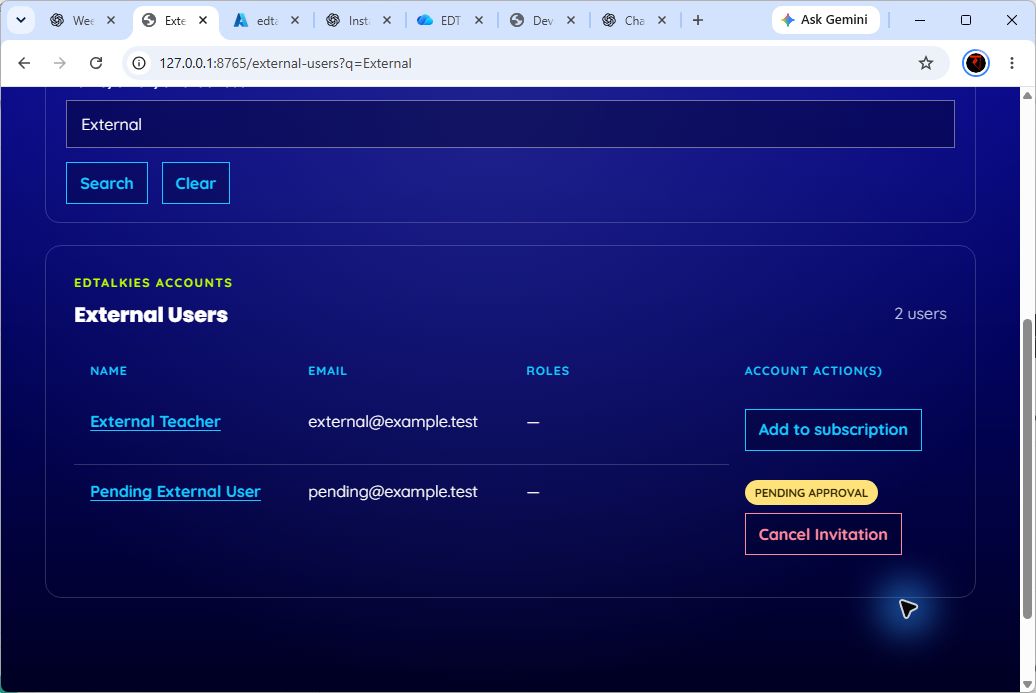
Add an existing EdTalkies teacher to the subscription
- Sign in as a Platform Admin or SuperAdmin.
- Open EIAM > External EdTalkies Users.
- Search by name, email, or exact user ID.
- Select the correct account and choose Add.
- Verify the displayed name, email, and user ID.
- Leave Require the user to accept the invitation selected when the teacher must accept membership.
- Select Confirm and add user.
- Open EIAM > My Users and confirm that the teacher appears after the invitation is accepted or the membership becomes active.
Finish setup in My Users
- In My Users, open the teacher's details.
- Select Change role if the default subscription role is not correct.
- Choose only a role offered by EIAM, enter a reason, and confirm.
- If the teacher is unverified and eligible, select Activate account, enter a reason, and confirm.
- Ask the teacher to sign in again and verify access.
Do not describe My Users as an account-registration feature. It is the post-membership management screen.