
Onboarding Teachers · HELP-15
User Account Deletion and Recovery
Schedule or cancel subscription user deletion and understand global controls.
Schedule deletion from My Users
- Open EIAM > My Users.
- Find the user and confirm the identity before continuing.
- Select Schedule deletion.
- Review the name, email, and role.
- Enter an optional reason and select Confirm deletion.
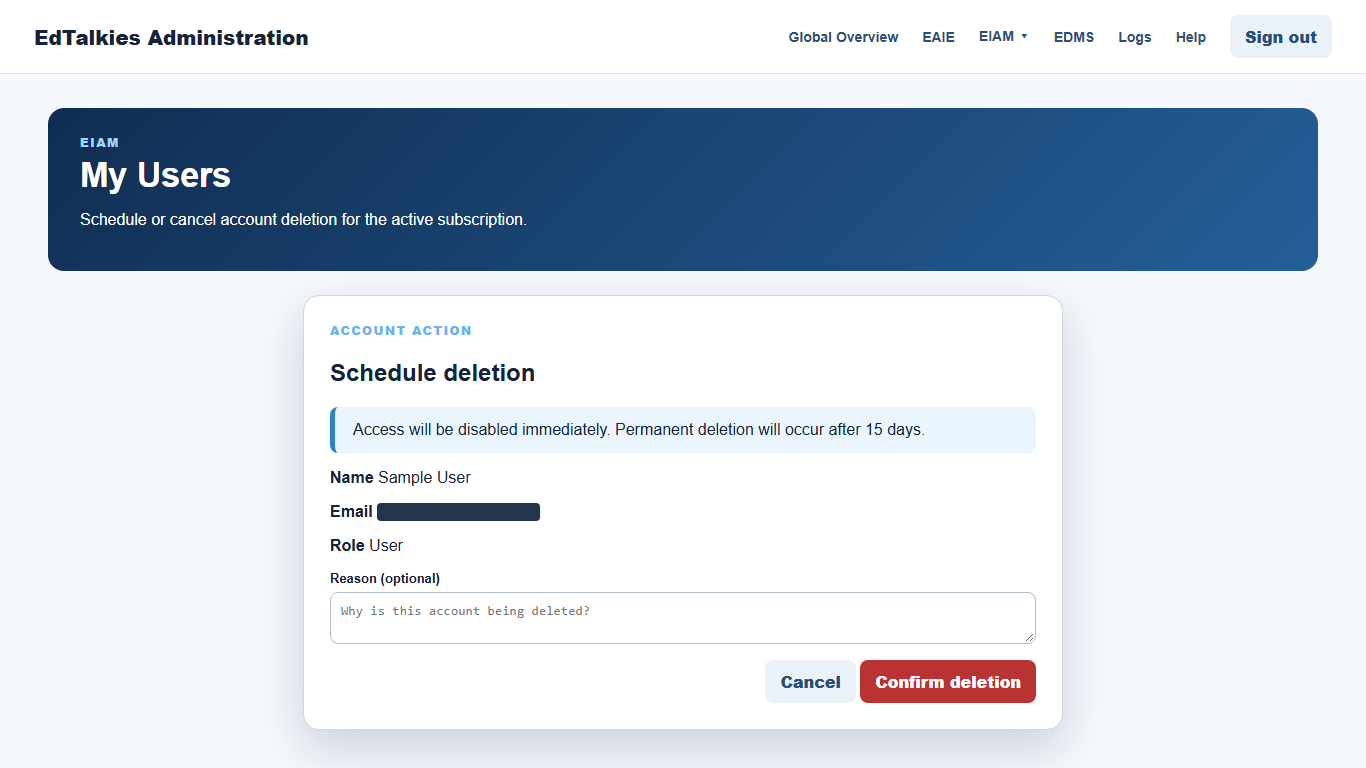
Access is disabled immediately. Permanent deletion is scheduled after 15 days. Administrators cannot schedule deletion of their own account through this workflow.
Cancel a scheduled deletion
Before permanent deletion occurs, find the account in My Users and select Cancel deletion. The user must sign in again after the cancellation.
Activation and deletion restrictions
An account scheduled for deletion cannot be activated. Cancel the deletion first, then verify the account state before using Activate account.
SuperAdmin account controls
SuperAdmins use global account actions for platform-wide suspension and restoration. These actions affect every subscription and connected application and require a reason plus an approval or incident reference. Subscription deletion scheduling and global suspension are different controls; confirm which outcome is required before acting.