
EAIE · HELP-19
Monitoring and Viewing EAIE Documents
Filter documents, refresh processing state, and inspect document details.
Read the document row
Each row shows the filename, academic metadata, document ID and size, processing status and progress, integrity state, created and updated dates, and actions available for the current state.
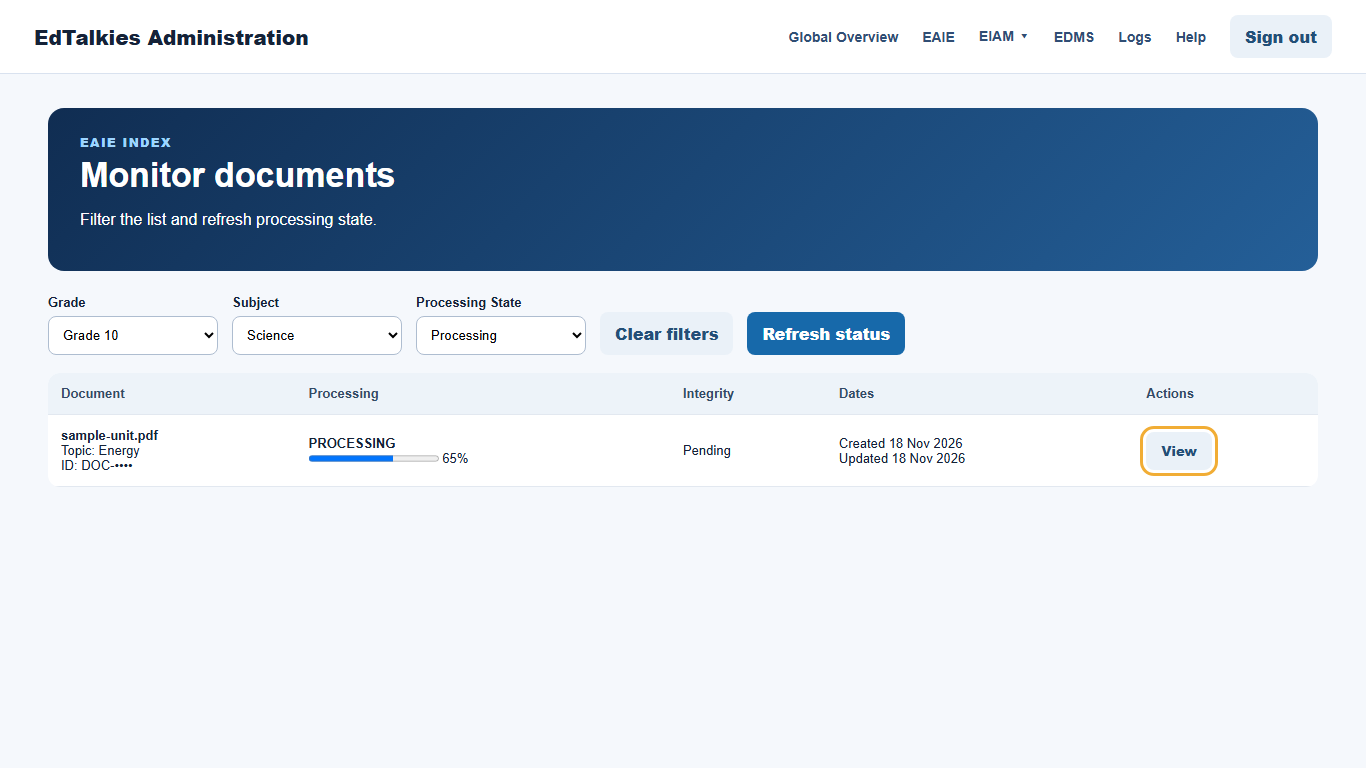
Filter and refresh
- Choose a Grade, Subject, or Processing State.
- Combine filters when you need a narrower result.
- Select Clear filters to return to the complete list.
- Select Refresh status to retrieve the latest state from EAIE.
Filtering changes the visible rows; it does not change the documents.
Open document details
Select View to open the current EAIE record and indexing state. Use Back to Document Management to return. If progress has not changed, refresh after allowing processing time. Record the document ID and safe error text when contacting support.